Getting the Most From the Best Charging Window (BCW)
Most solar advice only tells you where the sun is right now. That's not much help, because the sun keeps moving — by the time your panel is set up, it has already moved on. The Best Charging Window works the other way round: it finds the window of hours worth committing to, and tells you where to put the panel for that window.
However you like to set up, it optimises for that
The sun moves about 15° every hour, so any one position is only right for a window of time. That makes the useful question how long you want to charge for today, and when you want to start.
| How your day goes | What you get |
|---|---|
| Set it up once and get on with the day | One position, best across the whole day's useful light |
| Set up in the morning, shift it after lunch | The best position for each half, so both timeframes land |
| A few hours between weather fronts | The best position for exactly those hours |
You set the window — or give it a duration, or ask the app to find the day's best window (BCW) — and it gives you the position for that.
For a window away from the middle of the day, positioning for it can pull in a fifth or more across those hours than the best all-day setting. Around midday the two are much the same. That can be the difference between a full battery and a flat one if you've got three hours of sun between fronts.
Reading the card
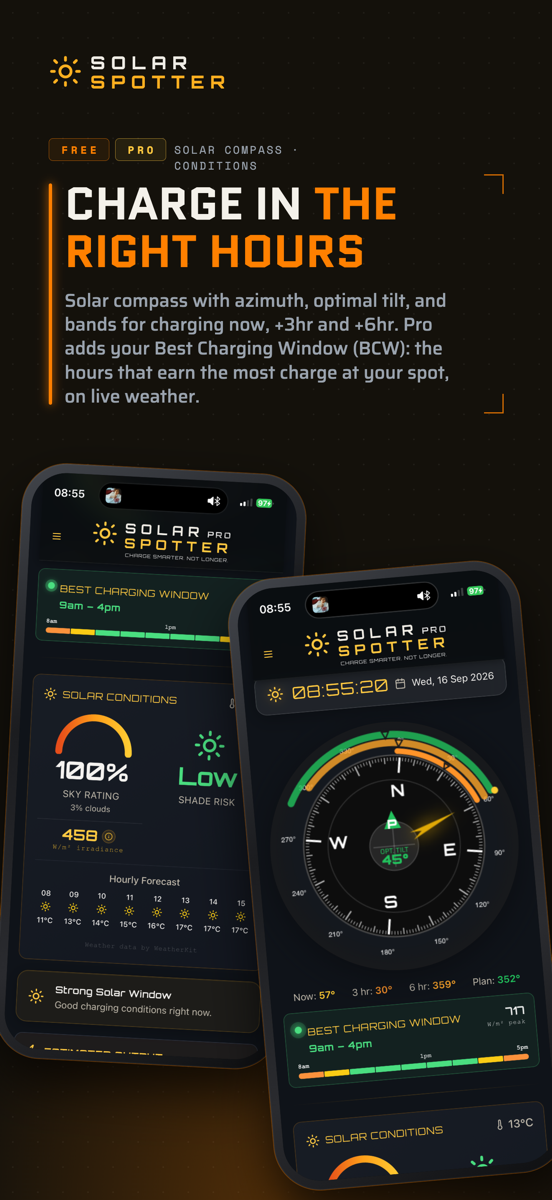
Two things to take from it:
- The hours. This is when the day is actually going to deliver — not sunrise to sunset, but the window where irradiance and sun angle are both strongest. On a clear summer day that's wide. On a patchy winter one it can be surprisingly narrow, and knowing that at breakfast is the difference between catching it and missing it.
- The day's quality. If the window is short or the day grades poorly, that's the honest ceiling rather than a fault. A grey day where nothing charges well is worth knowing about early, because the useful response is to ease off the big loads — not to spend an afternoon checking connections.
It updates as the day moves. Cloud clears, the window widens; a front comes through and it narrows. It re-checks the forecast every 15 minutes, so it follows the day rather than sticking with this morning's forecast.
The bands on the compass
Open the compass and you'll see arcs sitting outside the main dial. These are the same idea drawn in space rather than time:
- The 3-hour band — where to position your panel if you care about the next three hours.Free
- The 6-hour band — the same for the next six.Free
- The custom window arc — the one matched to your charging window.Pro
The gap between the "now" direction and those bands is the entire argument for the feature. Positioning your panels to the optimal bearing and tilt for your chosen charging window gives significant gains over eyeballing where the sun is now. That's what the app is for — helping you maximise your solar charge, so you can stay enjoying the outdoors for longer.
What free gets, and what's Pro.
- Free gets the 3-hour and 6-hour bands on the compass, and a Solar Day reading that grades the rest of today, from now to sunset.
- Pro adds:
- the Best Charging Window itself
- the custom window arc on the compass
- setting your own charging window or duration
- AR Overlay and AR Panel Mode
Setting your own window
The BCW finds the best hours of the day. That isn't always the question you're asking — sometimes you know you're breaking camp at eleven, or you'll only be back at the vehicle from three, and the best hours are no use if you aren't there for them.
So you can set it yourself. Open the menu, turn on Planned Charge and choose how:
- Window — the exact hours you'll be set up for.
- Duration — how long you'll charge for, starting now.
- BCW — the day's Best Charging Window.
The compass then shows the green arc and a Plan bearing, and the tilt in the centre matches.
The best window of the day and the best window for you are often not the same window. If you're out and about and not driving back to camp until after lunch, you're interested in what the rest of the afternoon can deliver for you.
Getting it right in practice
- Check it before you unfold anything. Ten seconds at the start lets you see what the rest of the day looks like.
- Set the window to your day, not the day's best. If you're heading off for the afternoon, you want to see what you can get into the battery by lunch.
- Take the tilt as seriously as the direction. Facing the right way and lying too flat is a very common way to lose a third or more of a winter day — and more the further you are from the equator. The setup guide has the numbers.
- Look up before you commit. The window tells you where the sun will be; only you can see the tree. A shadow that arrives mid-window can cost more than the positioning gained — here's why shade hurts out of proportion.
- Re-check if the sky changes. The window moves with real conditions, so a clearing afternoon can hand you a window that wasn't there at breakfast.
What it's doing underneath
Solar Spotter builds the window from the sun's geometry for your exact latitude, longitude and date (exact astronomy), combined with cloud and irradiance over your spot, refreshed as the day goes on. Same job whether you're camping, in a van, overlanding or boondocking, at any latitude in either hemisphere.
The geometry half runs entirely on your phone, so it keeps working with no reception at all. The weather conditions half needs a signal to refresh and caches when it can't get one, which is why the app keeps telling you how old its weather is rather than presenting stale data as live.
What it can't do is see your campsite. It doesn't know about your trees, your awning or the ridge to the west, and it doesn't pretend to — those are yours to look at. It gives you the half you can't work out by eye.
There's no account, no tracking and no analytics of any kind. The sun maths runs on your phone. The only time your location leaves it is the weather request, so the forecast is for where you are — and nothing is stored. Any latitude, either hemisphere, any season, and the whole thing is a one-off purchase rather than a subscription.
Common questions
What is the Best Charging Window?
It's the window of hours today that will actually deliver charge, worked out from the sun's track for your exact location plus the cloud and irradiance expected over your spot. Rather than telling you where the sun is at this instant — which stops being true within about twenty minutes — it gives you one position to set the panel for a whole useful window of the day.
Is the Best Charging Window free or Pro?
It's Pro, along with the custom window arc on the compass and the ability to set your own window and duration. Free users get the 3-hour and 6-hour direction bands on the compass and a Solar Day reading that grades the rest of today from now until sunset. AR Overlay and AR Panel Mode are Pro features too.
Can I choose my own charging window instead?
Yes, and it's the setting most worth using. You can pick the hours you'll actually be set up for, give a duration starting now, or let the app use the day's best window. The day's best hours and the hours you'll actually be there for are often different, and positioning for the wrong one is an easy loss to miss.
Does it work without phone signal?
Partly, and the part that matters most does. Sun position and panel geometry are calculated on the phone and need no reception at all. Cloud and irradiance need a signal to refresh, so those cache when you're out of range — and the app tells you how old that data is rather than presenting it as current.
Does the window account for shade at my campsite?
No, and nothing on a phone honestly can — it doesn't know where your trees are. It gives you the half you can't work out by eye: exactly where the sun will be through the window. You supply the other half by looking up before you set up. Because shade costs far more than its size suggests, that ten-second check is worth just as much as your positioning adjustments.
Set up for the hours that matter
The Best Charging Window is part of Solar Spotter Pro — a one-off purchase, no subscription, and your data stays on your phone.